Card search: typing stops after picking a card
Why the search box stops accepting input on iPhone, whether it can be improved, and how to test it.
Confirmed After a card is picked, the box still looks active, but the iPhone keyboard is no longer connected to it. Keys are pressed and nothing arrives. We reproduced this in Apple's iOS simulator, on the same kind of screen the client recorded.
Confirmed Yes. It is the same problem. The earlier fix is a workaround that runs after each pick, and it does not reliably restore the connection. This weakness was already known in August.
Not proven We found possible reasons but cannot prove any of them yet. The card search code has barely changed since August. Device testing is needed (see How to test).
Partly The freeze has been stopped twice before, but each time the client rejected the side effect. One option has no recorded result and is worth a short test. If it fails, this becomes a choice between trade-offs, not a technical fix.
What the client's recording shows
The recording is 18 seconds long, on an iPhone, version v1.9.0. The user types か and taps a card, over and over.
| Pick | Chips move to | Typing afterwards |
|---|---|---|
| 1 | Row 1 | Works |
| 2 | Row 1 | Works |
| 3 | New row 2 | Stops Keys are pressed and nothing appears, until the keyboard is closed and the box is tapped again |
| 4 | Row 2 | Works |
| 5 | New row 3 | Stops Same as pick 3 |
| 6 | Row 3 | Recording ends |
The ticket says "card number", but this recording shows kana being typed. Number entry may behave differently, because the workaround is skipped when plain digits are typed. It is included in the test steps below.
What we measured
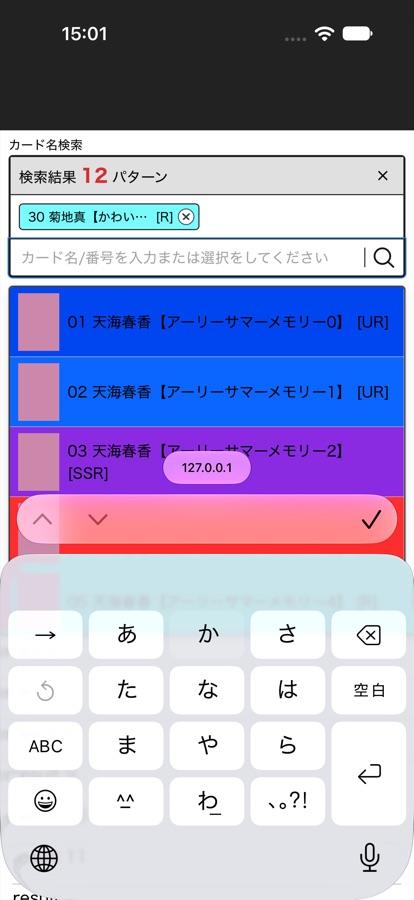
We tapped the real on-screen Japanese keyboard in an iOS 27 simulator. The test page used the real search box code with sample data, not the full live site.
| Run | After first pick | Later picks measured |
|---|---|---|
| 1 | Stopped | 6 of 6 worked |
| 2 | Stopped | 6 of 6 worked |
| 3 | Stopped | 6 of 6 worked |
While frozen, the page still reported the search box as focused, yet three key presses produced no input at all. Tapping the box again fixed it every time.
Limits of this test
- The search box version running on iPhone was not measured. These runs used
CardSelectLegacy. Production very likely usesCardSelectIOS(see the technical notes). All three runs on that version failed because our test tool could not complete a pick, so they say nothing about the product. Both versions share the same workaround. - The pattern differs. The simulator stopped on pick 1. The client's phone stopped on picks 3 and 5. So we reproduced the failure, but not when it happens.
- Results come from one iOS 27 simulator and three runs. They do not give a real-world failure rate.
Why it happens
- Japanese text is unconfirmed while it is being typed. iOS keeps a private connection between the keyboard and the box during that time.
- Picking a card clears the box while that connection is still open.
- To recover, our code moves the cursor to a hidden box and back. This keeps the keyboard open, which the client asked for in July.
- That usually works. When it doesn't, the page has no way of knowing: the box looks fine, and the keyboard is up but feeding nothing.
- A real finger tap rebuilds the connection. Code cannot do this by refocusing a box that already has focus.
Why it may feel worse
None of these is proven.
| Possible reason | Evidence | Status |
|---|---|---|
| A different search box version now runs on production | Release settings imply production moved to the iOS version after August. On 11 August the client said that version, on beta, seemed worse than production at the time. QA also saw it fail more often on beta than on staging. Both versions carry the same workaround. | Strongest lead, unconfirmed |
| The moment the box moves down | On the client's recording, input stopped on the two picks that added a chip row. This would explain "about 3 cards" and the older "5th card" report. In the simulator, later new rows worked, so this is not the full explanation. | Open |
| A newer iPhone or iOS version | The problem depends on iOS behaviour. The client's iOS version is unknown. | Unknown |
| A heavier page on each pick | Not measured on the live site. It is also not required: the failure happened on our lightweight test page. | Open |
| Changes to the search box itself | Since 11 August, the only changes to it were usage logging. | Unlikely |
Options
Results below come from the June to August work on real iPhones. Nothing here was retested for this report.
| Option | Result so far | Cost for the user | Size | |
|---|---|---|---|---|
| 1 | Swap in a new input box on each pick, so iOS builds a fresh connection | No recorded result Prepared in August, then parked when the client asked to go back | Possible brief flicker | Small |
| 2 | Close the keyboard after each pick | Stopped the freeze Client rejected it on 1 July | Reopen the keyboard for every card | Small |
| 3 | Don't clear half-typed text until the word is confirmed | Stopped the freeze Client rejected it on 5 August | The typed text stays in the box after a pick | Small to medium |
| 4 | Clear the text or reload the keyboard from code, without moving the cursor | Failed on iPhone Several versions tried on 5 August. Old text came back or doubled | Not applicable | Not applicable |
| 5 | Replace the search box library with a plain box | Failed on iPhone Still froze in August | Not applicable | Not applicable |
| 6 | Build our own on-screen keyboard | Not started Assessment ticket is blocked | Different typing experience | Large |
Recommended next step: test option 1 in the simulator, including the iOS search box version, then on a real iPhone. If it fails, the remaining paths are all trade-offs: accept the current behaviour, or ask the client to reconsider option 2 or 3, or choose option 6. The earlier rejections were made before the client reported this as getting worse, so they may be worth asking about again.
How to test
Before you start
- A real iPhone with the Japanese Kana keyboard, logged in to an account that can use the card search.
- Choose a game and 弾, on the カード名検索 screen.
Steps
- Tap the search box. Expected: the keyboard opens and the card list appears.
- Type
か. Do not press 確定. Expected: the list narrows to matching cards. - Tap a card. Expected: a chip appears, the box empties and the keyboard stays open.
- Without tapping the box, type
かagain. Expected: the text appears. If it does not, input has stopped. - If input stopped, write down the pick number. Close the keyboard, tap the box and continue. Expected: typing works again.
- Repeat until you have made 10 picks.
- Do three rounds. Reload the page between rounds.
- Repeat with card numbers typed on the number keys.
Please record
| iPhone model | iOS version | Safari or home screen app | Site version (footer) | Input type | Pick numbers where input stopped |
|---|---|---|---|---|---|
The same phone on production, beta and staging would be the most useful comparison. A failing pick number that always adds a new chip row would support the "box moves down" explanation.
Questions for the client
- Which iPhone model and iOS version do you use, and did either change recently?
- Do you use Safari or the home screen app?
- Does it also stop when typing numbers only?
- If the freeze cannot be removed any other way, which is more acceptable: the keyboard closing after each pick, or typed text staying in the box after a pick?
Technical notes
Production version check
CardSelect.jsx picks CardSelectIOS when VITE_TICKET_SERA_86EY1MHAD is on and the device is iOS. A code comment says production stays off. However, the flag is true on beta and is not in the _parity.yml allow-list, and full production releases have passed that gate, so production should match. This is inferred, because production was not read directly. A developer should confirm it, then correct the comment in featureFlags.js if needed.
Event trace for one frozen pick
click        target=option   chips 0 → 1
focusout     search box
focusin      hidden box
focusout     hidden box      (next frame, 25–33 ms)
focusin      search box      activeElement = search box
key × 3      no beforeinput, compositionstart or input on any element
Dead and working picks had overlapping refocus delays (25–33 ms and 25–60 ms), so delay alone does not explain the failure.
History of the earlier fixes
| Date | Change | Outcome |
|---|---|---|
| 1 Jul | Close keyboard after pick | Client rejected it |
| 1 Jul | Hidden box workaround, keyboard stays open | Passed retest |
| 9–13 Jul | Keep list open, keep number keyboard, cover single-character input | Released 31 Jul |
| 31 Jul | Client report from production | Input stops from the 5th card |
| 4 Aug | iOS version of the box, magnifier fix (#1132) | Merged to staging |
| 5 Aug | Workaround removed, clearing held until the word is confirmed (#1139) | Freeze stopped, but the client rejected it because the typed text stayed |
| 5 Aug | Clearing from code without moving the cursor | Failed on device: old text came back or doubled |
| 7 Aug | Plain custom box and recovery methods | Custom box still froze on iPhone. Input box swap and other recovery methods parked |
| 7 Aug | Client asked to return to the production box while a custom keyboard was considered | Reverted (#1151) |
| 11 Aug | iOS version restored behind a flag (#1160), without #1139 | Hidden box workaround kept |
| 12 Aug | Client feedback on production | "Better than before" |
| 26 Oct | Client recording for this ticket | Input stops after about 3 cards |
How the simulator test was run
An XCUITest drove Safari on an iPhone 18 Pro simulator (iOS 27.0) and tapped the software keyboard. The page mounted the real CardSelectLegacy and SelectedList with a sample store of 87 cards and logged focus, composition and input events. Each run made 8 picks. Picks where the test tap missed the card were excluded, and the last pick of each run had no typing after it. The test kit is not published because it is built around private application code.